
For supermarket owners and pickup teams preparing for the holiday rush.
A customer orders the ingredients for a familiar holiday meal. Your team picks most of them, replaces one item and splits the order across several bags. The customer arrives expecting the original list. Which change did they approve, and where is the last bag?
This guide gives you a completed order example, wording to adapt and a short practice exercise. It focuses on customer information and order identification. Your store’s food handling and temperature controls remain separate operating requirements.
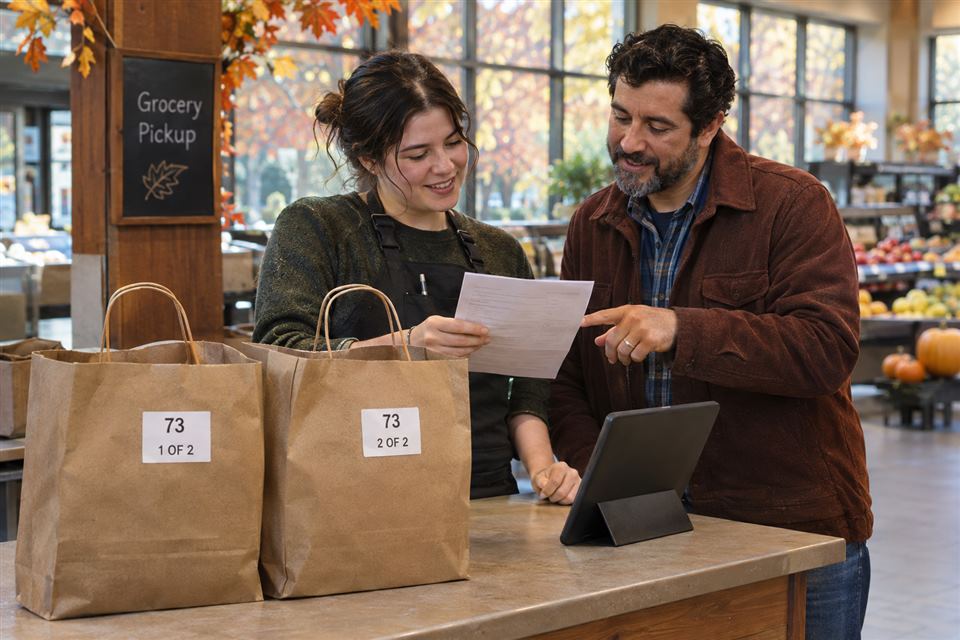
Why holiday pickup needs a clearer information trail
A replacement that works for an ordinary weekly shop may be unwelcome when someone needs a particular ingredient for a family recipe. Price, quantity and timing matter too. A shopper who misses a notification may discover the change only after arriving.
In one public discussion about grocery substitutions, shoppers describe both avoiding replacements and being satisfied when their own selected alternatives are used. These are individual accounts, not a survey of all grocery customers. Their useful lesson is that shoppers have different preferences.
The operational details also vary. Walmart’s substitution guidance, for example, describes item preferences and a limited period for accepting or declining an offered replacement. Treat that as one retailer’s process, then describe your own store’s actual rules.
1. Record the decision before choosing the packaging
Check what your ordering system already captures. For each relevant item, can the picker see a preferred alternative, a request for no replacement or a need to contact the shopper? Can the next employee see whether the customer responded?
If the software handles those choices, train the team to use the existing fields. For phone or counter orders, use a simple record tied to a unique order ID. Avoid a second handwritten system that can disagree with the original order.
Decide how an unanswered question is handled before orders open. State the response deadline and the result of no response using your actual policy. Do not leave an employee to invent that decision at the collection counter.
A completed example: order 73
Illustrative only: an independent supermarket takes a pantry order for Wednesday collection, 3–4 p.m.
- Original item: one 15-ounce can of the customer’s selected pumpkin product.
- Preference: no replacement for this item.
- Picking result: unavailable; remove the item and record the adjustment under the store’s policy.
- Customer update: explain the missing item before collection. Do not call the order “complete.”
- Package count: two bags, each marked with order 73 and its own number.
- Unresolved issue: none before the order is marked ready.
The label does not decide which product is an acceptable replacement. It helps employees locate the order after the decision is recorded.
2. Send a message that tells the shopper what to do
A promotion, an order confirmation and a ready-to-collect message have different jobs. An order cutoff is relevant before purchase. The collection message should identify the order, explain any change and give one clear arrival instruction.
A recent grocery holiday communication plan separates order deadlines, pickup details and store hours. That is a useful distinction. Set your own dates around your capacity and suppliers rather than copying another store’s suggested calendar.
Customer message to adapt
“Order 73 is ready for Wednesday collection, 3–4 p.m. Your selected pumpkin item was unavailable and was removed according to your no-replacement preference. Please review the adjustment in your order summary. There are two bags. Come to the service desk and show your confirmation. If that window no longer works, contact us through the details in your confirmation.”
Replace the details with the actual order, location, contact method and policy. Send through the store’s established order communication channel. Keep promotional messages separate.
Read the message as a customer would: Can I tell which order this is? Do I know what changed? Is it actually ready? Where do I go? What should I do if I cannot arrive? If a question remains, fix the wording before sending.
3. Separate the permanent label design from changing order details
A preprinted label can carry the store name and a reusable layout. Order IDs, package counts and collection windows change. Leave those fields blank for completion on site, or use your existing order-label printer.
Keep public-facing information minimal. Use an order ID that your team can match against the customer’s confirmation. Keep contact details, sensitive notes and the detailed order record in the system rather than on an exposed bag.
| Information | Where it belongs | What to check |
|---|---|---|
| Store name and fixed collection instruction | Reusable printed design | Still correct across ordinary orders |
| Order ID and package number | Each package’s current label | Matches the final order and total bag count |
| Proposed or approved replacement | Live order record | Current customer decision is visible to the team |
| Ready status and arrival instruction | Customer message | Sent after the order passes the store’s checks |
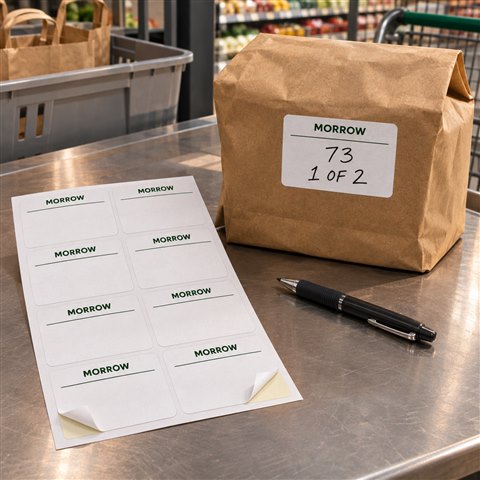
DecentCustom’s custom product labels offer configurable sizes, shapes and materials. The product is described in sheets: confirm the selected label size, labels per sheet and total required labels before ordering. A sheet quantity and an individual-label quantity are different purchasing units.
Before committing, try the intended pen on the chosen finish and test a sample on your actual outer packaging. Check legibility, writing space and adhesion under the conditions you use. An AI illustration does not establish those results. Keep required original product information visible.
4. Choose grocery bags around the contents and the handoff
A branded bag is optional. Existing bags and a clear identification method may already meet the need. Consider a custom tote when your store has a continuing use for it and its size suits the intended contents.
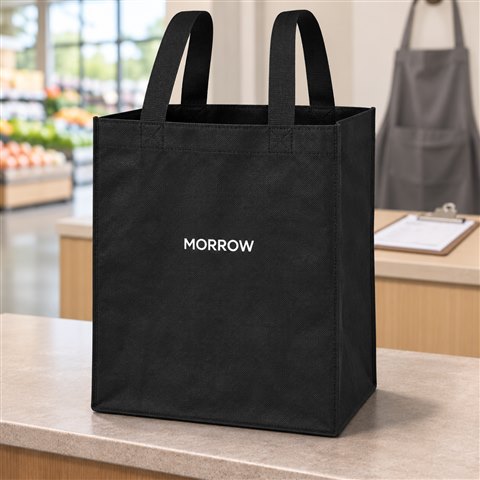
For example, the 13 × 15 × 10-inch non-woven grocery tote has an open main compartment and an inner bottom board. Its listed imprint area is 5 × 8 inches, which is smaller than the bag’s front. Keep the artwork inside that print area rather than designing to the full bag dimensions.
Check the largest intended package against the opening and base, then trial the actual packing arrangement with a sample. Dimensions alone do not establish a safe carrying weight. This tote is not presented as an insulated cold-chain carrier. Review the selected product’s order options separately from its case-pack information.
For a near-term holiday, verify production and delivery timing before ordering custom materials. If the arrival date cannot be confirmed, use available supplies for the immediate job and plan a later custom order.
5. Rehearse the order before the busy collection window
Use an empty practice order. Have one employee prepare it and another, who did not pack it, perform the collection check.
- Match the record. Find order 73 from a sample confirmation. Check that the current record shows the final item decisions.
- Find every package. Locate both bags and read their individual numbers. If only one is visible, stop the handoff and find the other.
- Read the message. Check that the stated location and window match the store’s current plan. Correct conflicting versions.
- Test an exception. Pretend the shopper disputes a change. The employee should know who handles it and where to record the outcome.
- Close the record. Mark the practice order collected only after the checks are finished. Remove the practice materials from live work.
Record the first point where the second employee had to guess. Fix that field, message or instruction, then repeat that part of the exercise. After a real collection session, review which issues recurred. That provides more useful evidence for your next material order than assuming a larger logo will fix the process.
What to prepare—and what can wait
Prepare the order fields, a current collection instruction and a way to identify every package first. Compare custom stickers and labels when you know the surface, size, finish and order unit you need. Keep dated holiday details out of a large permanent print run unless the planned use justifies them.
Custom materials support a defined process. They cannot correct inaccurate stock records, make an unanswered customer decision or add staff capacity. If a plain label and your existing system work well, keep using them.
Common planning questions
Should every bag carry the same label?
Repeat the same order ID, but give each package its own number and the total count, such as 1 of 2 and 2 of 2. Recheck the count if packing changes.
Can one printed label replace the order system?
No. Use the order system or established master record for live item decisions and status. The package label helps staff match a physical package to that record.
Do we need custom packaging for a holiday pickup service?
Only if it fits a continuing need, the actual contents, your budget and a confirmed timeline. Existing packaging and temporary identification may be sufficient.
Start with one order your team can explain
Before ordering materials, complete one sample order from preference to collection. When the process is clear, review custom products from DecentCustom for the fixed information and packaging your store actually needs. Give changing order details their own space, and verify the product specification and artwork before buying.
Editorial scope: public shopper discussion, current retailer guidance and a holiday communication example informed the topic. The worked order and MORROW visuals are fictional. No customer result, packing test or sales increase is claimed.