
For independent U.S. corner stores and community shops preparing their holiday schedule.
“Are you open on Thanksgiving?” is a reasonable question when a neighbor is deciding whether to walk over for groceries. A regular weekly schedule does not necessarily answer it. Neither does a window notice that says only “Holiday hours may vary.”
Below is a complete fictional Thanksgiving-week example, a practical verification routine and answers your staff can adapt to customer questions. The example hours are not a recommendation that your store should open or close at those times.
Why customers still call, even when hours are online
In a public discussion about Thanksgiving-hours calls, one participant describes a small-town grocery store, while others explain that they call because a wasted trip matters or published hours have been unreliable. Another employee describes keeping updates current. These are individual, unverified accounts, not a measure of how often customers call or proof that any one platform causes the problem.
The useful lesson is to make confirmation easy. A caller may be checking the specific date, a particular location or a service that operates for fewer hours than the store. Answer that question directly; sending the person back to a listing that prompted the uncertainty may leave it unresolved.
A holiday-hours notice with the details filled in
Thanksgiving falls on Thursday, November 26, in the official 2026 calendar. Confirm your own operating plan before putting hours into artwork. Include the year when a notice could be mistaken for one retained from a previous season.
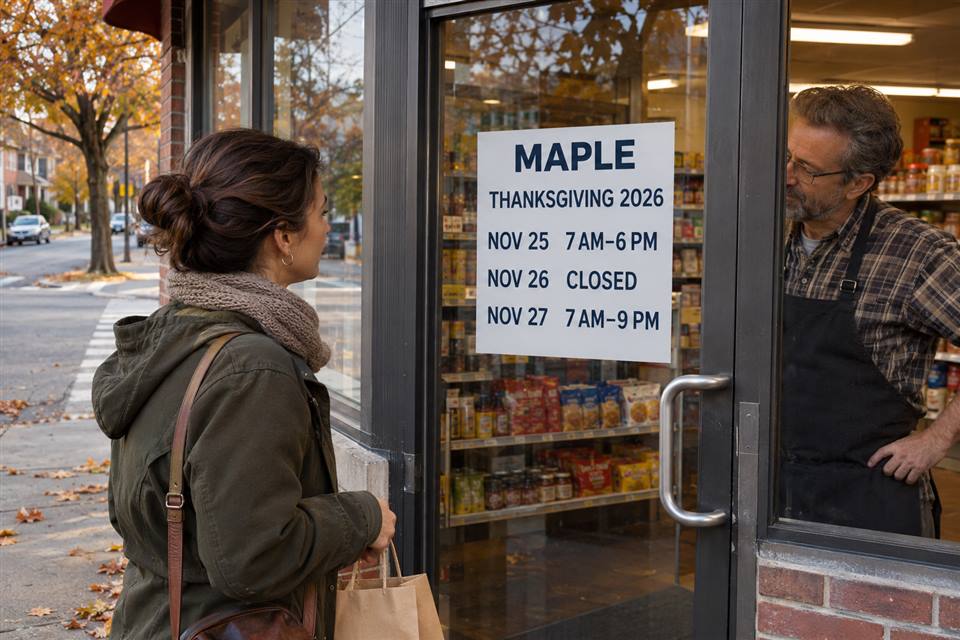
MAPLE CORNER SHOP — THANKSGIVING 2026
| Date | Shop hours |
|---|---|
| Wednesday, November 25 | 7 AM–6 PM |
| Thursday, November 26 — Thanksgiving | Closed |
| Friday, November 27 | 7 AM–9 PM |
Regular daily hours resume Friday, November 27: 7 AM–9 PM.
Fictional example. All times are local to this shop. MAPLE, the schedule and the illustrations are demonstration material, not a real store announcement.
This notice answers an early close, the holiday closure and the next opening. A blank space beside November 26 would be less useful than “Closed.” A message saying “Back Friday” would leave the opening time unresolved. Replace the entire example with your approved dates and times, including any days that are open as usual when confirmation would help.
Separate shop hours from any service-counter hours
If your corner store also offers parcel collection, a deli counter or another separately staffed service, check its schedule before implying that every service is available until the main door closes. If no service differs, keep the notice simple.
For example, suppose the fictional MAPLE shop closes at 6 PM on November 25, but its parcel counter closes at 4 PM. Add a clearly named line: “November 25: shop closes 6 PM; parcel counter closes 4 PM.” Put that information where parcel customers check it, including the counter and the relevant service page. The counter’s closing time does not establish a carrier’s collection time or delivery deadline.
Do not ask the cashier to improvise exceptions. Agree on the last available service time with the person responsible for that operation, then give the team the same wording.
Update Google for the actual holiday dates
Google’s current Special hours instructions distinguish temporary date changes from the regular weekly schedule. In the account managing the correct location, go to Edit profile → Hours → Special hours, select or add the date, enter the opening and closing times or mark it Closed, then save. Google recommends confirming official holidays even when the hours remain unchanged; Special hours require the profile to be set to Open with main hours.
For eligible, separately timed services, Google also documents More hours. Review the supported service type and its displayed schedule separately. Do not assume changing the shop’s holiday hours automatically updates a pickup counter, your website or another listing.
This is a short holiday-week example. Use Google’s current help for a longer closure or a different business setup. Interface labels and available options can vary; the important result is the correct public information for the intended date and location.
Verify one date from the customer’s side
Take the approved November 25 entry and check it across the places your shop actually uses. Open the public website and business listing as a customer would. Expand the hours to the relevant date instead of relying only on today’s “Open” status. Stand outside and read the door notice. Check the phone greeting or the reply staff will give. If you offer online ordering or another timed service, check its availability too.
Record the result, including a mismatch rather than a simple tick. For example: “November 25: door and website show 6 PM; public listing still shows 9 PM.” Have the authorized profile manager review the correct location and date, follow the platform’s update or support process, and recheck the public display. Until the discrepancy is resolved, keep your own dated notice, website information and staff reply clear. Do not promise an immediate listing correction that you have not seen.
Repeat the check after a late schedule change. Give one person responsibility for updating the affected places and telling the next shift. When regular hours resume, retire the expired customer-facing notice and check that the remaining information reflects the current schedule.
A phone reply that gives a complete answer
For the fictional MAPLE schedule:
“MAPLE Corner Shop: on Wednesday, November 25, we’re open 7 AM to 6 PM. We’re closed Thanksgiving Day, November 26, and reopen Friday, November 27, at 7 AM. Friday’s closing time is 9 PM.”
If the caller asks about a particular service, add that service’s approved hours. If you do not know an exception, check with the responsible person rather than guessing. For a recorded greeting, use the current dates and provide a contact route only if someone actually monitors it.
Choose a sign people can read when you are closed
A paper notice in a suitable existing holder can be enough for a brief holiday change. Check it from outside with the door shut: reflections, stacked merchandise or a lowered shutter can hide information that looked clear from inside. Make the dates and times the priority. Keep essential hours readable without requiring a QR scan or a social-media login.
If a more consistent printed presentation fits your storefront, compare custom marketing materials against the location, message lifespan and update effort. A beautiful dated sign becomes misleading when the schedule changes, so decide who will replace it before committing to a print run.
A window-cling option for an approved notice
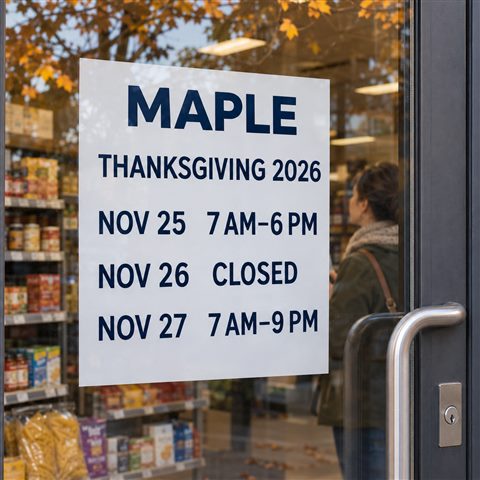
The linked custom window clings, SKU decentcustom-mm-000163, list clear and white material choices, clear or opaque backgrounds, and inside- or outside-glass options. A 12 × 18-inch size is among the listed formats. Confirm the selected material, mounting side, artwork reading direction and application instructions before ordering; no removal, reuse or weather-resistance performance is established here.
Proof the actual notice at the intended size. Check the complete dates, AM/PM, reopening time and the view from the street. If a clear background makes the type difficult to read against your merchandise, change the artwork or selected background. A sample or proof helps judge the specific choice; the AI image does not certify its physical performance.
Customer questions worth preparing for
These questions reflect the confirmation and conflicting-information themes in the discussion above. They are not a measured popularity ranking.
“Are you open on Thanksgiving, or is that your normal Thursday schedule?”
Give the holiday’s date and actual hours, not only the weekly schedule. For the fictional example: “We’re closed Thursday, November 26, and reopen Friday, November 27, at 7 AM.” If your shop is open, state the opening and closing times explicitly.
“Google says you close at 9 PM. Can I still come at 8?”
Confirm the location and date, then give the approved hours for that day. Acknowledge the discrepancy and pass it to the person managing the listing. For the fictional November 25 early close: “Our shop closes at 6 PM that Wednesday. Thank you for checking; we’ll review the listing.” Do not encourage a trip based on an unverified display.
“The shop is open. Does that mean the parcel counter is open too?”
Only if that service operates at the same times. Name its actual hours and any approved collection conditions. In the optional example, the parcel counter closes at 4 PM while the shop stays open until 6 PM. Confirm carrier-specific information through the responsible service; the store schedule alone cannot answer it.
Make the next visit predictable
A useful holiday notice makes a small promise that the shop can keep: here is when you can visit, and here is when the service you need is available. Settle the schedule, test the public information and prepare the staff answer. When a printed format serves that plan, explore custom products from DecentCustom and confirm the exact product configuration.
The workflow is editorial guidance based on the linked sources. All MAPLE hours, service examples and verification outcomes are illustrative. No actual store trial, reduced call volume or sales improvement is claimed.