
BURGER SHOPS · CLEAR GROUP ORDERS
For a group burger order, keep each distinct burger combination on its own line: exact menu item, requested changes and who will receive it. Combine quantities only when the item and every change are identical. Then verify the selected restaurant, collection details, sides and drinks before submitting.
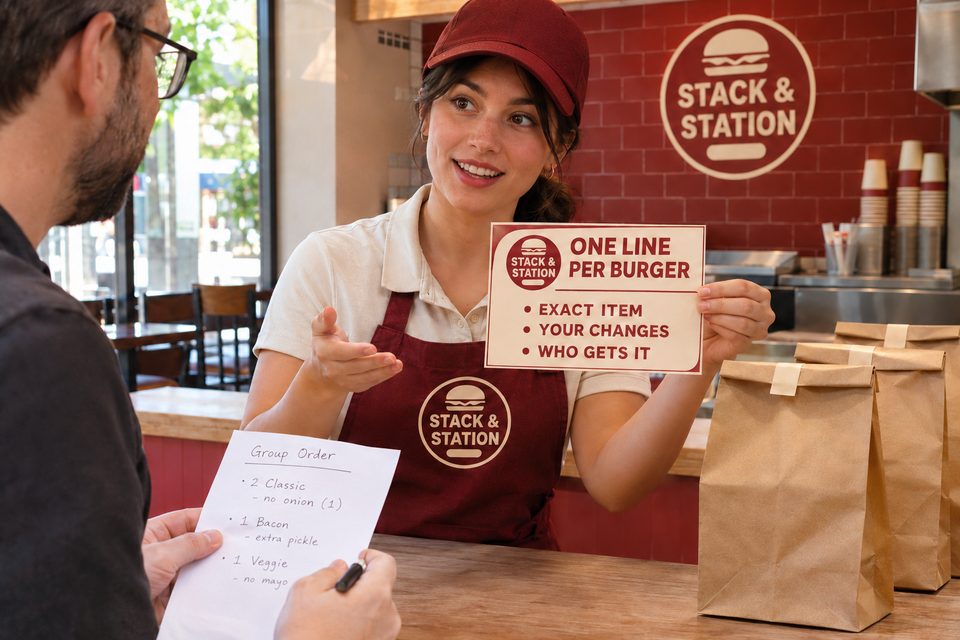
“Two cheeseburgers, one with no onions, and the other plain” sounds short enough to remember. But which burger is which? Does plain keep the cheese? Did the app apply the note to both? A useful order list makes those answers visible before the kitchen starts preparing it.
Begin with the menu item, then describe the change
The Mad Mike’s guide to ordering burgers for a group recommends collecting complete orders and checking the pickup location. Build on that by preserving each person’s exact combination from your list through the cart and collection.
Start with the current menu name rather than a generic description such as “a small burger.” On the Five Guys burger menu, for example, Hamburger, Cheeseburger and their Little versions are named separately. The Five Guys FAQ explains that a Little Hamburger has one patty instead of two. An extra patty is therefore an addition to an existing base, not a reliable way to communicate the final number without checking that base.
That is one brand’s example, not a rule for every burger shop. Read the selected restaurant’s current description, including what comes with the item, before adding or removing anything.
Give “plain” a precise meaning
Plain can leave an unanswered question when it follows a named cheeseburger or a preset topping combination. Instead of relying on that word alone, say which base item you want and which listed ingredients or optional toppings should remain. Ask the shop to clarify an ambiguous option before ordering.
In a Five Guys forum discussion about a missing plain option, the original poster described an app requiring a topping selection; another reader said their location still offered plain. Other replies highlighted contradictory selections such as plain plus additional toppings. These are individual experiences, not a verified explanation of the software or a chain-wide policy.
If the desired change is unavailable, avoid selecting an unwanted ingredient just to get past the screen and assuming a later note will override it. Confirm the available way to place that exact order with the restaurant or choose another acceptable menu option.
A complete example: six burgers, five distinct lines
Fictional group order: Alex is collecting lunch for coworkers from Stack & Station. In this example, the shop has confirmed the named items and the requested changes below. These are invented menu items, not a current offer from a real restaurant.
| Who / quantity | Exact base item | Confirmed changes |
|---|---|---|
| Alex — 1 | Single Hamburger | Bun and patty only; no listed sauces or optional toppings. |
| Sam — 1 | Single Cheeseburger | No pickles. Keep the item’s other listed defaults. |
| Jordan — 2 | Single Cheeseburger | Both identical: ketchup only among the optional toppings; keep the cheese. |
| Casey C1 — 1 | Double Cheeseburger | No onions. Keep the item’s other listed defaults. |
| Casey C2 — 1 | Double Cheeseburger | Use the listed default toppings; no changes. |
The count is 1 + 1 + 2 + 1 + 1 = 6 burgers. Jordan’s two can share a quantity of two because the complete combination matches. Casey’s two stay separate because the onion request applies to C1 only. A single “quantity two, no onions” line would lose that distinction.
Alex also records two orders of regular fries for sharing and four bottled waters, after the group has chosen those quantities. Those are separate order lines, not assumed inclusions with six burgers. This is not a portion recommendation: another group may choose different sides, drinks or meal sizes.
Before submission, Alex compares the cart with all five burger lines. If the service supports an item identifier, C1 and C2 can distinguish Casey’s two. If it does not, Alex asks what identification the shop can provide and keeps a private copy of the list for distribution.
Check the actual channel, not just the main website
Available changes can differ between ordering channels. The Five Guys FAQ, for instance, says extra bacon is available by asking in a location but is not available through online ordering or delivery. Do not assume an in-person option appears in every app.
Toast’s documentation on third-party menu compatibility also describes menu features that some delivery integrations do not support. That supports checking the actual customer-facing menu. It does not diagnose the forum poster’s issue or establish which ordering system a particular shop uses.
For shop owners, review whether the options shown to customers communicate your intended choices clearly. Check that the final order record retains the selected changes next to the correct item. This guide does not require changing your POS configuration or promise a measured reduction in errors.
A useful read-back at pickup
“This is Alex’s group pickup at the selected Stack & Station location, order EXAMPLE-318. We have six burgers across five distinct combinations: one for Alex, one for Sam, two identical for Jordan, and Casey’s C1 and C2 with different onion instructions. We also ordered two regular fries for sharing and four bottled waters. Could you help us match the item identifiers and confirm the order lines before we leave?”
Use the restaurant’s actual order reference and pickup instructions. Match the receipt and any item identification the shop provides; a total bag count alone does not tell you which customization belongs to whom. If something is unclear, ask staff to resolve it rather than distributing similar packages by guesswork.
This article deals with preference notes. If a diner has an allergy or another food-safety requirement, contact the restaurant directly about that specific need before placing the order. A label, plain option or removal note is not an allergy-safety guarantee.
A small printed prompt for the next group order
Shop owners can make the ordering conversation easier with one short prompt customers can take away:
STACK & STATION — ONE LINE PER BURGER
Exact menu item.
Your requested changes.
Who gets it.
Different changes? Use separate lines.
Confirm the selected location and current ordering options.
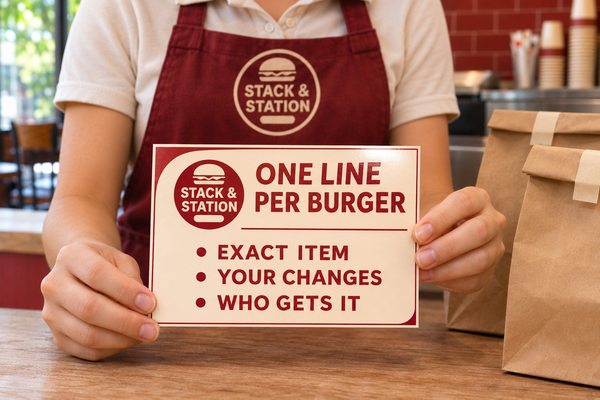
A branded takeaway guide
Custom printed order-guide cards for burger shops can present that message with your logo. The linked paper postcard offers a horizontal 6 × 4-inch option; 16pt Premium and Glossy Front only are listed as defaults. Confirm your selected size, stock, finish and artwork when ordering.
The illustration shows a flat paper card on a dry counter, separate from food. It is a communication aid, not a replacement for the receipt, an order-identification system or food-contact packaging. Try the wording on ordinary paper first if that meets your needs.
Explore custom marketing materials for burger shops or browse custom products from DecentCustom when you need a coordinated shop presentation.
Frequently asked questions
Can I combine several burgers on one order line?
Combine quantities when the base item and all selected changes are identical. Split them when a change applies to only one burger, and check the cart keeps the right choices next to each item.
Does a plain cheeseburger still include cheese?
Do not rely on that phrase alone. Start with the exact menu item and confirm what the shop means by plain, including whether the cheese, sauces and optional toppings remain.
What if the app does not offer the change I want?
Check with the restaurant about the supported way to order it. Avoid assuming a general comment will override a conflicting menu selection or that an in-person option is available online.
How do we tell similar burgers apart at pickup?
Ask what item identifiers the shop provides, match them with the receipt and your group list, and clarify differences with staff before leaving. Identifiers help distribute the order; they do not independently verify ingredients or allergy safety.